Completing your profile is a crucial step for you to become job-ready. It ensures that all fields are filled out, making it easier for brands to find and connect with you.
Mobile App
After logging into our app tap on the hamburger menu (three horizontal lines) in the top-left corner. From the menu, select Profile Info to fill your details.
Details to enter in your profile:
Username: The name you will be addressed by on our platform
Full name: Your name as per official identification documents
Email address: For receiving updates and notifications about your jobs
Date of Birth (DOB): Helps us match you with brands targeting influencers of specific age groups
Gender: Enables us to connect you with brands looking for influencers of a particular gender
Location: To match you with brands targeting specific regions
Publishing languages: It is the languages you use to create content in, helping us align you with brands targeting specific language audiences.
Web App
After logging into our website, you'll land on the dashboard. Navigate to the top-right corner of the screen and click on the drop-down arrow (refer to image 1).
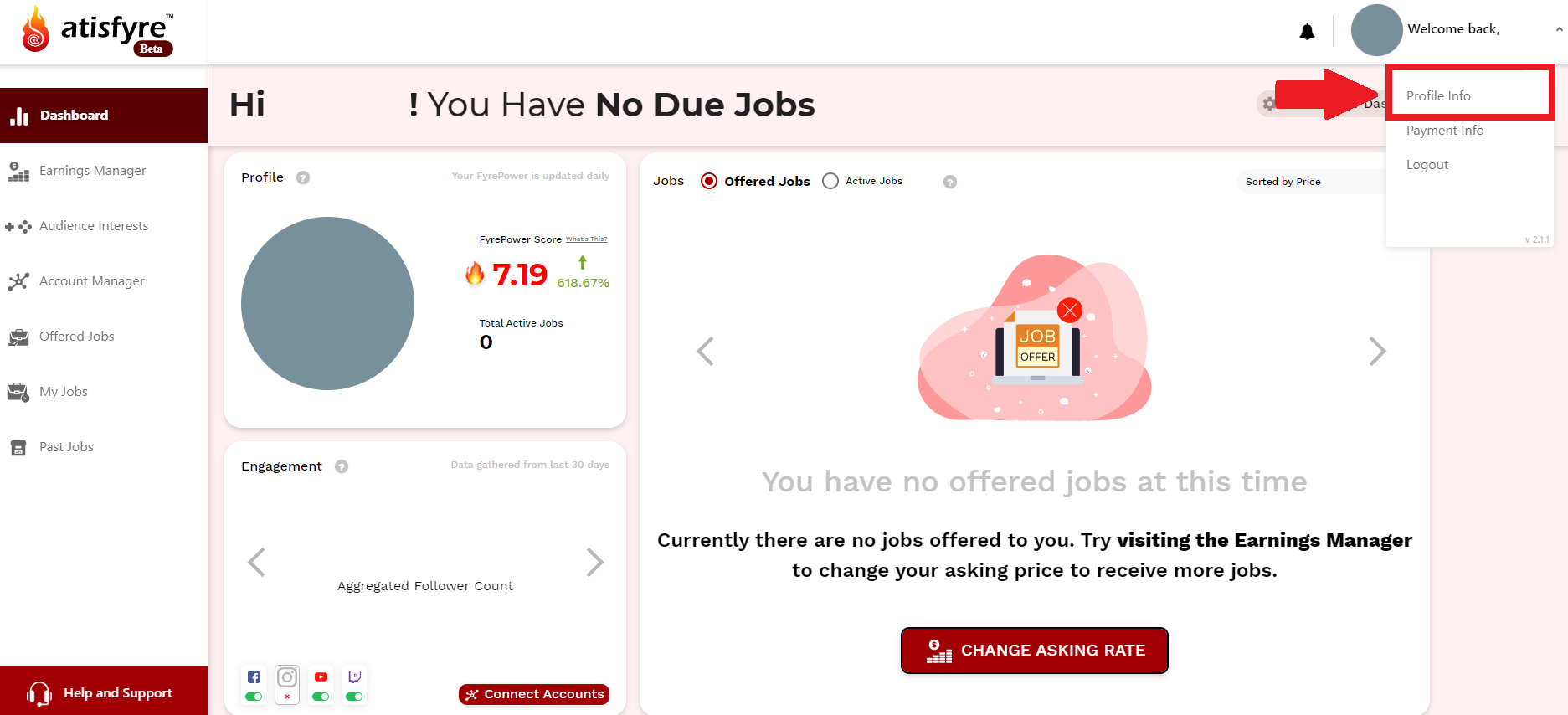
From the menu, select Profile Info to start setting up your profile.
Details to enter in your profile:
Username: The name you will be addressed by on our platform
Full name: Your name as per official identification documents
Email address: For receiving updates and notifications about your jobs
Date of Birth (DOB): Helps us match you with brands targeting influencers of specific age groups
Gender: Enables us to connect you with brands looking for influencers of a particular gender
Location: To match you with brands targeting specific regions
Publishing languages: It is the languages you use to create content in, helping us align you with brands targeting specific language audiences.